<>Article</>
Collaborative Chat in a SaaS with React and Twilio: Beyond Text Messages

Abstract
Implementing chat in a SaaS sounds simple until messages stop being just text. This article documents how we integrated Twilio Conversations with React to build a collaboration system where users shared and discussed digital assets in real time — and the lessons it left behind.
Implementing a chat in a web application sounds simple until the chat stops being just text. In 2023, I worked on integrating a real-time messaging system into a SaaS where users managed digital assets, PDFs, images, videos, with an ownership and permissions model. Chat wasn’t a secondary feature: it was the collaboration layer that allowed users to reference, share, and discuss those documents in context, both in 1-on-1 and group conversations.
This article documents the technical decisions, the real problems I faced, and what I learned integrating Twilio Conversations with a React SPA that already had its own state complexity. At the end, I include a reflection on how I would approach the same problem today, in 2026.
The Problem: Contextual Collaboration, Not Just Chat
The SaaS allowed each user to manage their own assets as an owner. You could upload documents, organize them, and, most relevantly, grant read or write permissions to other users or groups. Think of something similar to how permissions work in Google Drive, but integrated within the platform’s business logic.
The chat requirement emerged because users needed more than notifications: they needed conversations around those assets. Sending a link by email and waiting for a response wasn’t enough. The natural flow was: you’re working on a document inside the app, you need feedback from a colleague, you open a chat and send a direct reference to the asset. All within the same context, without leaving the application.
This defined two immediate technical requirements:
- Real-time messaging with support for individual and group conversations, with the ability to dynamically subscribe and unsubscribe.
- References to system assets within messages, not just plain text or generic file attachments. The chat needed to understand that a message could contain a reference to a document managed by the SaaS, with its associated permissions.
Why Twilio Conversations (and Not a Custom Solution)
The first decision was whether to build the chat infrastructure from scratch with pure Socket.IO or use a managed service. The evaluation was quick:
Pure Socket.IO gave us full control, but it meant building and maintaining all the logic for message persistence, user presence, channel management, reconnection, and guaranteed delivery. For a team focused on product features, not communication infrastructure, this was a considerable detour.
Twilio Conversations API offered exactly the model we needed: conversations as a first-class resource, with native support for individual and group chat. Its JavaScript SDK connected via WebSocket internally and exposed an event system that fit well with React. The conversation subscription model, where a user can join and leave conversations dynamically, mapped directly to our use case.
The cost model combined a Monthly Active User rate with media storage charges and standard SMS/WhatsApp rates if those channels were used. For our case, pure in-app chat without SMS, the dominant cost was the MAU, which was more predictable than a model based purely on message volume.
The decision wasn’t “Twilio is the best chat platform in the world.” It was: “Twilio lets us solve the chat problem in weeks, not months, and lets us focus on what truly differentiates the product, the assets and permissions system.”
Solution Architecture
The integration was designed in three layers:
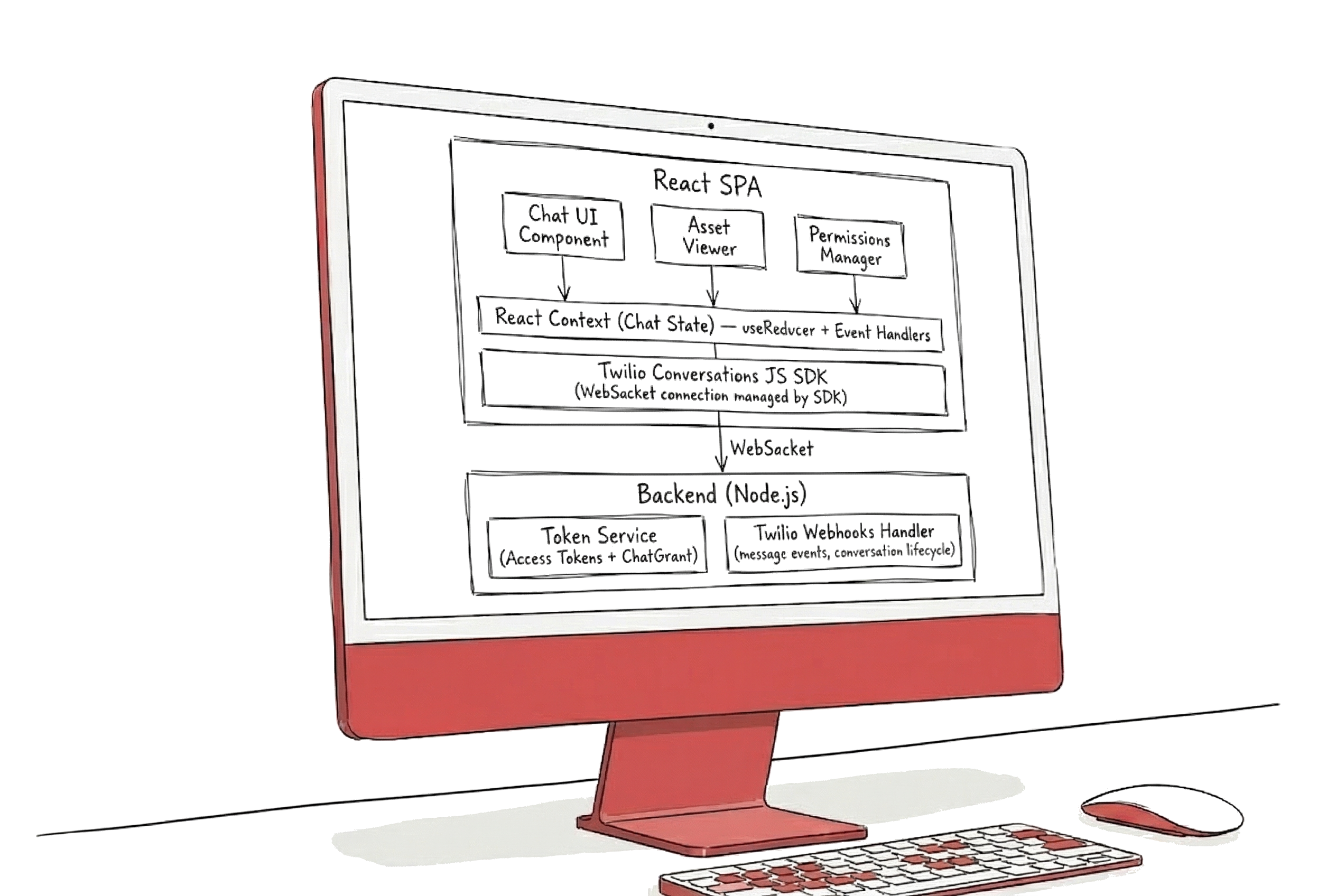
The Authentication Flow
Twilio requires Access Tokens with a ChatGrant for each user to connect to the SDK from the frontend. The flow was:
- The user authenticates in the SaaS with their normal session.
- The frontend requests an Access Token from our backend, passing the user’s identity.
- The backend generates the token using Twilio credentials (Account SID, API Key, API Secret) and returns it to the client.
- The Twilio Conversations SDK initializes with that token and establishes the WebSocket connection.
// Backend: Access Token Generation
import Twilio from 'twilio';

const generateChatToken = (identity: string): string => {
  const { AccessToken } = Twilio.jwt;
  const { ChatGrant } = AccessToken;

  const token = new AccessToken(
    process.env.TWILIO_ACCOUNT_SID,
    process.env.TWILIO_API_KEY,
    process.env.TWILIO_API_SECRET,
    { identity, ttl: 3600 }
  );

  const chatGrant = new ChatGrant({
    serviceSid: process.env.TWILIO_SERVICE_SID,
  });

  token.addGrant(chatGrant);
  return token.toJwt();
};
A detail we learned the hard way: tokens expire. The SDK emits tokenAboutToExpire and tokenExpired events that you must handle to renew the token without interrupting the user experience. If you don’t handle them, the user silently loses the WebSocket connection and stops receiving messages with no visual feedback.
State Management with React Context
The chat state lived in a dedicated React Context with useReducer. The decision not to use Redux was pragmatic: chat was an isolated domain from the rest of the application state, and a Context with reducer gave us enough structure without adding a global dependency.
// Chat state types
interface ChatState {
  client: Client | null;
  conversations: Map<string, Conversation>;
  activeConversation: string | null;
  messages: Map<string, Message[]>;
  connectionState: 'connecting' | 'connected' | 'disconnected';
}

type ChatAction =
  | { type: 'CLIENT_INITIALIZED'; payload: Client }
  | { type: 'CONVERSATION_JOINED'; payload: Conversation }
  | { type: 'CONVERSATION_LEFT'; payload: string }
  | { type: 'MESSAGE_RECEIVED'; payload: { conversationSid: string; message: Message } }
  | { type: 'CONNECTION_STATE_CHANGED'; payload: ChatState['connectionState'] };

const chatReducer = (state: ChatState, action: ChatAction): ChatState => {
  switch (action.type) {
    case 'MESSAGE_RECEIVED': {
      const { conversationSid, message } = action.payload;
      const existing = state.messages.get(conversationSid) || [];
      const updated = new Map(state.messages);
      updated.set(conversationSid, [...existing, message]);
      return { ...state, messages: updated };
    }
    // ... other cases
  }
};
The key pattern was listening to Twilio SDK events and dispatching actions to the reducer. Each Twilio event (messageAdded, conversationJoined, participantUpdated) mapped to a reducer action, keeping React state synchronized with what the SDK reported via WebSocket.
Asset References in Messages
This was the most interesting aspect of the implementation. A message in our chat wasn’t just text, it could contain a reference to a SaaS asset. Technically, this was solved using the custom attributes that Twilio allows associating with each message:
// Send a message with an asset reference
const sendAssetReference = async (
  conversation: Conversation,
  assetId: string,
  comment: string
) => {
  await conversation.sendMessage(comment, {
    assetRef: assetId,
    assetType: 'document', // 'document' | 'image' | 'video'
    permissions: 'inherited', // permissions are validated server-side
  });
};
On the frontend, when the chat component rendered a message with an assetRef in its attributes, it displayed a card with a document preview instead of plain text. Clicking that card opened the SaaS asset viewer, respecting the permissions of the user viewing the message.
Permission validation was crucial: someone referencing a document in a chat doesn’t mean you have access to it. The backend verified permissions before serving the asset content, regardless of whether the message existed in the conversation.
The Real Challenges
Reconnection and Stale State
The most persistent problem was reconnection. Users left tabs open for hours, the laptop went to sleep, the WiFi connection fluctuated. The Twilio SDK handles automatic reconnection, but the UI state doesn’t magically sync. After a reconnection, you could have messages that arrived while disconnected that the SDK wouldn’t re-emit as events.
The solution was implementing a reconciliation mechanism: upon detecting a successful reconnection (the connectionStateChanged event), we reloaded the last N messages from each active conversation using the SDK’s pagination API, and compared them with what we had in local state.
Multiple Active Conversations
In our SaaS, a user could be subscribed to dozens of conversations simultaneously, one per project or working group. Each conversation generated independent events. The first naive approach of subscribing to all conversations on app load generated an event volume that degraded frontend performance.
The optimization was to subscribe only to the events of the conversation currently visible on screen, and maintain a “lightweight” subscription (only unread counters) for the rest. When the user switched conversations, we swapped subscriptions.
Cross-Browser: The Safari Ghost
Safari on iOS had a particularly problematic behavior with long-duration WebSocket connections. When the user switched tabs or minimized the browser, Safari could aggressively suspend the WebSocket connection. Upon returning, the SDK needed to reconnect, but the visual state was already stale. This edge case forced us to add a visibilitychange listener that forced a state reconciliation when returning to the tab.
useEffect(() => {
  const handleVisibilityChange = () => {
    if (document.visibilityState === 'visible' && client) {
      // Force reconciliation when returning to the tab
      reconcileConversationState(client, dispatch);
    }
  };

  document.addEventListener('visibilitychange', handleVisibilityChange);
  return () => document.removeEventListener('visibilitychange', handleVisibilityChange);
}, [client]);
What Worked and What Didn’t
Worked well:
- React Context + useReducer as the chat state manager. Keeping the chat domain isolated from the rest of the app’s global state was the right call. The reducer acted as a clean translator between Twilio events and React state.
- Custom message attributes for referencing assets. Twilio allows arbitrary metadata on each message, which saved us from building a parallel layer to link messages with system assets.
- The dynamic subscription/unsubscription model. Users entered and left conversations according to their work context, and Twilio’s API handled this natively.
Didn’t work as well:
- Access tokenization without proactive refresh. Initially we waited for the
tokenExpiredevent to renew. This caused a gap of seconds where the user lost connectivity. We migrated to proactively renewing withtokenAboutToExpire. - Blindly trusting the SDK’s reconnection. The SDK reconnects the WebSocket, but doesn’t guarantee that your UI state will be consistent afterwards. We had to build all the reconciliation logic manually.
- Underestimating the cost of mass subscriptions. Subscribing to 30+ conversations simultaneously was technically possible but inefficient. The lazy subscription pattern should have been there from day one.
2026 Update: What Would I Do Differently Today?

Three years have passed since this implementation, and the real-time communication landscape has changed significantly.
Twilio: From Dedicated Chat to Omnichannel
Twilio deprecated Programmable Chat in July 2022 and consolidated everything into Conversations API. The strategic direction is clear when you look at the product: Conversations API is an omnichannel API, it unifies chat, SMS, WhatsApp, and Facebook Messenger under the same interface. That’s an enormous strength if your use case crosses channels, but it also means the product isn’t designed specifically to compete with dedicated in-app chat platforms like Stream or Sendbird, which were born to solve that problem exclusively.
This isn’t a criticism of Twilio, it’s a matter of product focus. Twilio is a communications platform, not a chat platform. If you’re evaluating Twilio today for a use case similar to ours, collaborative chat within a SaaS, it’s worth assessing whether the features you need (threads, reactions, moderation, advanced typing indicators) are natively covered by Conversations API or if you’ll end up building them on top of the base API.
The Alternatives Have Matured
The current ecosystem offers more specialized options:
- Socket.IO remains the open-source option for full control. Since version 4.7 (June 2023) it supports WebTransport as an optional transport in addition to WebSocket, though with practical limitations: WebTransport isn’t available in Safari, requires HTTP/3 on the server (which Node.js doesn’t support natively, requiring third-party packages), and its adoption in production infrastructure is still limited. In practice, WebSocket remains the dominant transport. The community is enormous and the library is actively maintained (v4.8.3, December 2025). Ideal if your team can manage the infrastructure.
- Ably has positioned itself as the reference platform for applications requiring delivery guarantees and message ordering, with a 99.999% uptime SLA. It includes a React UI Kit and a dedicated Chat SDK. It’s the enterprise option.
- Supabase Realtime is interesting if you already use Supabase as your backend. Database changes propagate automatically as real-time events, which simplifies the architecture for notifications and live updates. However, Supabase Realtime isn’t a complete chat solution on its own: it doesn’t include features like user presence, typing indicators, paginated history, or UI kits. You’d need to build all that layer on top of the Broadcast and Presence primitives it offers. It’s a good foundation if you want full control and are already in the Supabase ecosystem, but the development effort is considerably greater than with a dedicated platform.
What Stack Would I Choose Today?
For the same problem, collaborative chat with asset references within a SaaS, my approach in 2026 would be different:
- Ably or Socket.IO, depending on whether the team prefers a managed service or full control. Twilio would no longer be my first choice for pure in-app chat.
- Zustand instead of Context + useReducer for chat state management. Zustand offers the same simplicity as Context but with better performance on partial updates and without the unnecessary re-render problem that Context causes in large component trees.
- Typed message structure with Zod to validate message payloads with asset references, instead of relying on custom attributes without validation.
- I would evaluate integrating an AI agent into the chat flow for features like conversation summarization, semantic search in history, or contextual suggestions based on referenced assets.
Conclusion
Implementing real-time chat within a SaaS forces you to solve problems that go beyond sending and receiving messages: permission management, contextual references to system entities, state reconciliation after disconnections, and performance with multiple active channels.
Twilio Conversations was the right decision in 2023 for our context: it allowed us to deliver the functionality quickly and focus on the business logic that differentiated the product. But the most valuable lesson wasn’t about Twilio, it was understanding that an SDK that abstracts WebSockets doesn’t free you from understanding how real-time communication works underneath. Every reconnection bug, every stale state, every message lost in Safari reminds you of that.
Chat in web applications is not a solved problem. It’s a problem with many partial solutions that you must adapt to your context. The key is choosing the right battles: use managed services for infrastructure that doesn’t differentiate you, and build custom what is core to your product.