• Article
Analysis of Continuous Facial Recognition in React for Protecting Confidential Documents
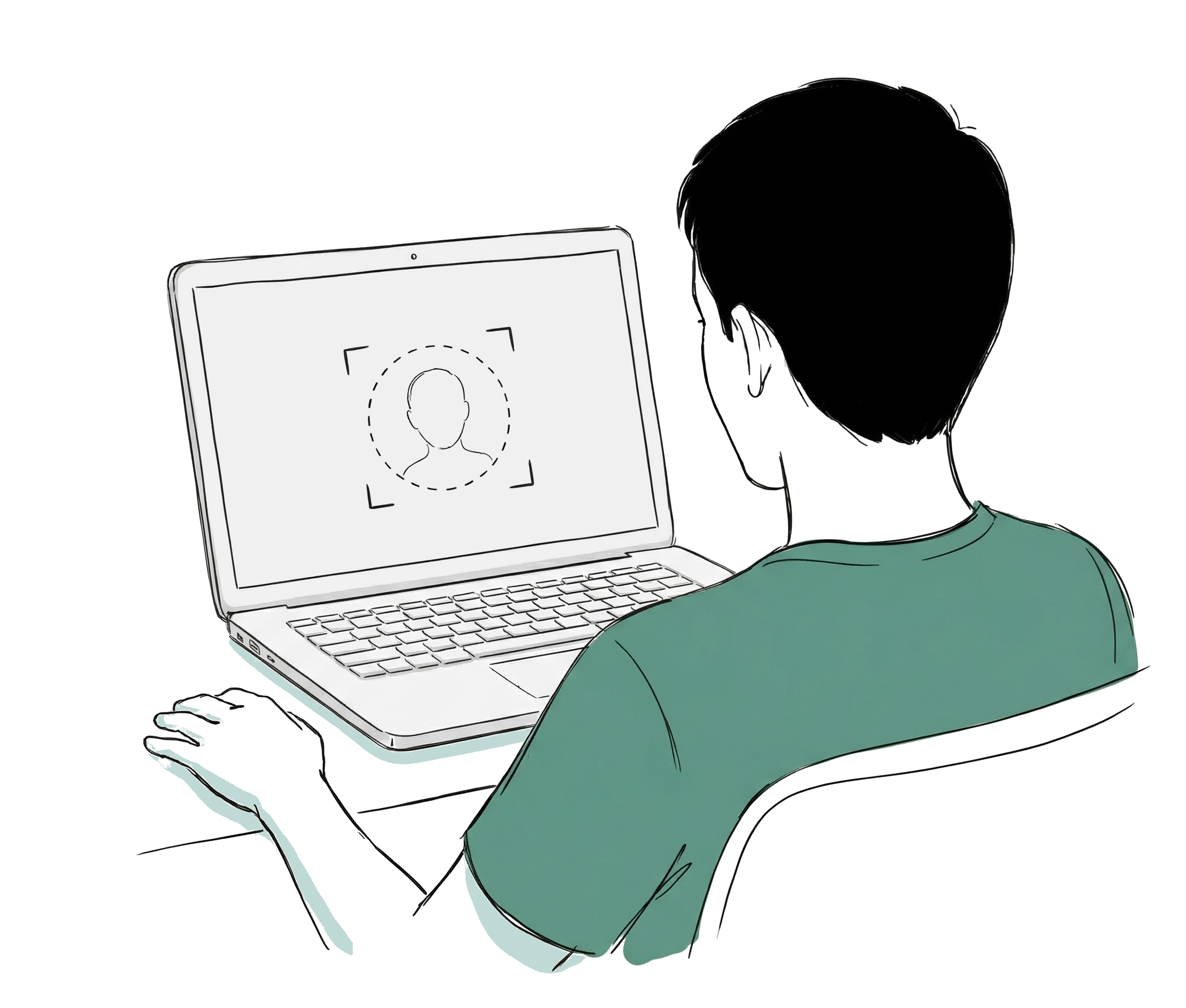
Facial recognition in web applications is typically associated with authentication — replacing passwords with your face. But there is a less explored and more technically demanding use case: continuous privacy monitoring. Not verifying who you are once, but constantly monitoring who is in front of the screen while sensitive documents are visible.
In 2023, I worked on a project where the requirement was exactly that. The product was a SaaS that originally ran as a native mobile application, and the team was migrating it to a hybrid app with ReactJS to unify the codebase across mobile and web. The application displayed confidential documents, and the client needed to guarantee that only the authorized user could view them. If another person appeared in front of the camera — a coworker looking over their shoulder, someone walking behind them — the screen had to block immediately. And it should only unblock automatically when the camera detected solely the authorized user’s face.
The migration to React added an important constraint: the facial recognition solution had to work both in the web browser and inside a webview on mobile, with the same codebase. That ruled out native iOS/Android SDKs and pushed us toward JavaScript libraries that ran in the browser context.
This article documents the architecture we designed, the technical decisions we made, what worked, what didn’t, and what I would change if I had to solve it today.
The Architecture: Client-Side Detection, Server-Side Recognition
A single library did not solve the complete problem. We needed two distinct capabilities: detecting that there are faces in front of the camera (how many? where?) and recognizing whether the detected face belongs to the authorized user. The solution was to separate these responsibilities between frontend and backend.
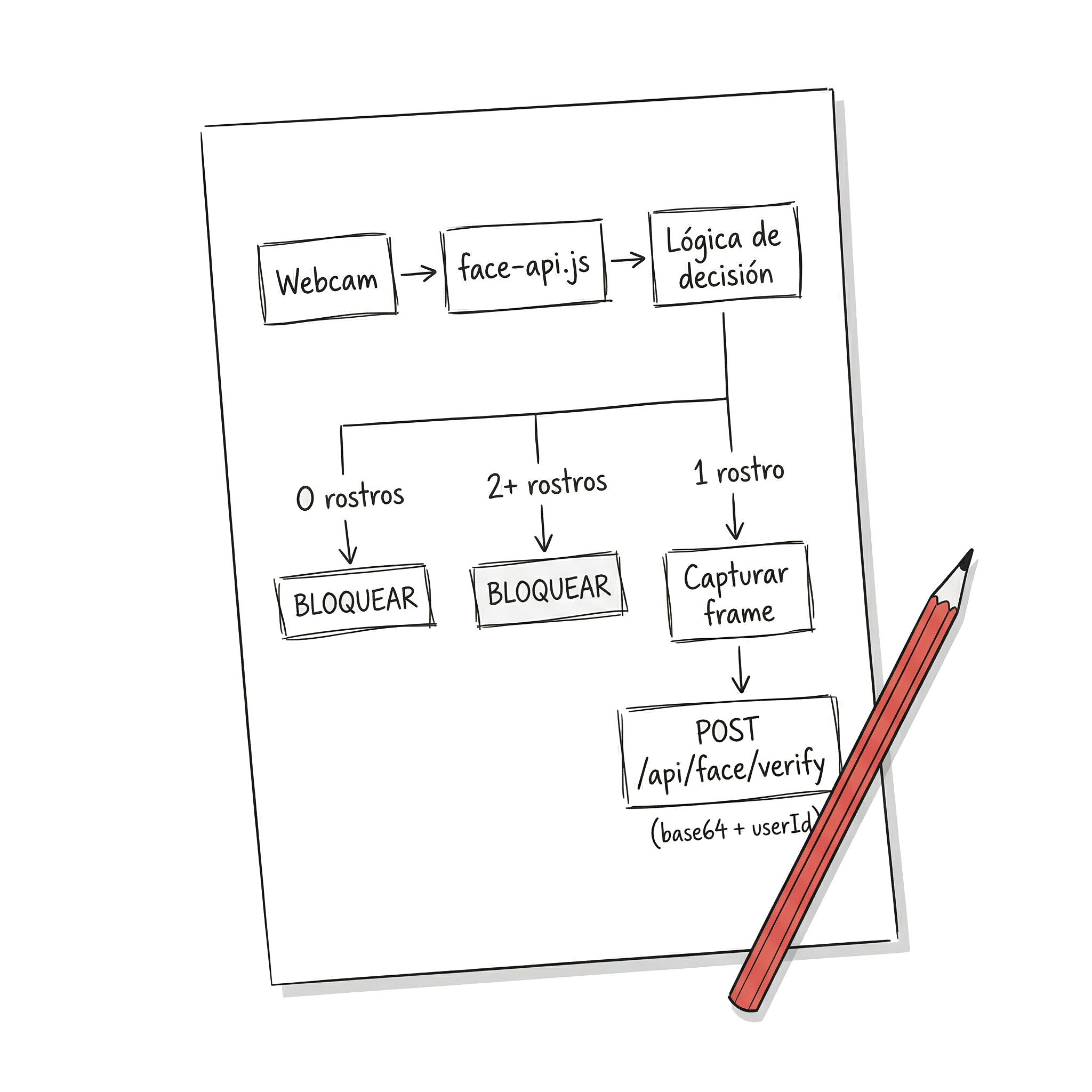
On the frontend, we used face-api.js inside the React application. This library, built on top of TensorFlow.js, runs face detection models directly in the browser — and that was key for our case. Since we were migrating from a native mobile app to a hybrid app with React, we needed a solution that ran with the same code both in the desktop browser and in the mobile webview. face-api.js, being 100% JavaScript executing in the browser context, met exactly that requirement without needing native bridges or platform-specific code. Its job was simple but critical: access the webcam, detect faces in each frame, and when conditions changed (a new face appeared, the user disappeared, multiple simultaneous faces), capture the image and send it to the backend.
On the backend, we built a custom API that integrated Luxand FaceSDK — the on-premise version, not the cloud service. Luxand handled the actual recognition: comparing the received image against the authenticated user’s biometric template and responding with a confidence level.
Why not use Luxand Cloud? Cost. We were building an MVP, and a cloud solution with continuous calls to a facial recognition API would have been prohibitively expensive. Each verification cycle generated a call to the backend, and with continuous monitoring, that meant dozens of calls per minute per user. With on-premise FaceSDK, the cost was a fixed license, not a variable expense that scales with usage.
Why not do all the recognition in the browser? Because face-api.js, while capable of basic recognition, did not reach the precision we needed for real access control. Its models are lightweight — designed to run in the browser — but that implies trade-offs in accuracy. Luxand, with heavier models running on the server, offered the precision that a security system demands.
face-api.js on the Frontend: Continuous Detection in React
Integrating face-api.js into React has its particularities. It is not a component you render and done — it is a system that needs access to the webcam, loads machine learning models, and executes inference in a continuous loop. All of that must coexist with React’s lifecycle without causing memory leaks or degrading performance.
Loading Models
The first step is loading the detection models. face-api.js offers several — SSD MobileNet, Tiny Face Detector — with different balances between accuracy and speed. For continuous detection, Tiny Face Detector was the right choice: faster, sufficient to know “there is a face here,” and lets Luxand handle the accuracy in recognition.
The models were served as static files from the same application. They weigh between 5 and 10 MB depending on which ones you load, and the first load can take a few seconds — something that must be handled with a loading state in the UI.
Webcam Access and Detection Loop
The component that encapsulates the webcam and the detection loop uses the browser’s getUserMedia API to get the video stream, and runs detectAllFaces from face-api.js at a regular interval to count the visible faces in each frame.
Some design decisions worth highlighting: The video element is hidden — the user does not need to see their own webcam; the component runs in the background while documents are visible. We set the detection interval at 500ms: a deliberate balance between responsiveness and performance. Faster consumes CPU without significantly improving security; slower leaves a window where someone could see the document before it blocks. And cleanup when the component unmounts is critical — without releasing the webcam stream and clearing the interval, a SPA with navigation generates severe memory leaks.
When to Send to the Backend
We did not send every frame to the backend — that would be unviable. The logic was based on state changes: if no face was detected, the screen blocked immediately without consulting the server. If two or more faces were detected, it also blocked instantly — no need to go to the backend. If there is more than one person looking, block. Period. Only when exactly one face was detected and the screen was blocked did the system capture the frame and send it to the backend to verify whether it corresponded to the authorized user. If the response was positive, it unblocked; if not, it remained blocked.
Luxand FaceSDK on the Backend: Identity Verification
The backend received the captured image and compared it against the biometric template of the logged-in user. The flow had two phases:
Enrollment (initial registration): When the user configured facial recognition for the first time, the app captured several images from different angles and sent them to the backend. Luxand generated a biometric template — a mathematical representation of the face — which was stored associated with the user.
Continuous verification: Each time the frontend sent a frame for validation, the backend extracted the template from the received frame and compared it against the stored template of the user. Luxand returned a similarity score, and if it exceeded a defined threshold, it confirmed the identity.
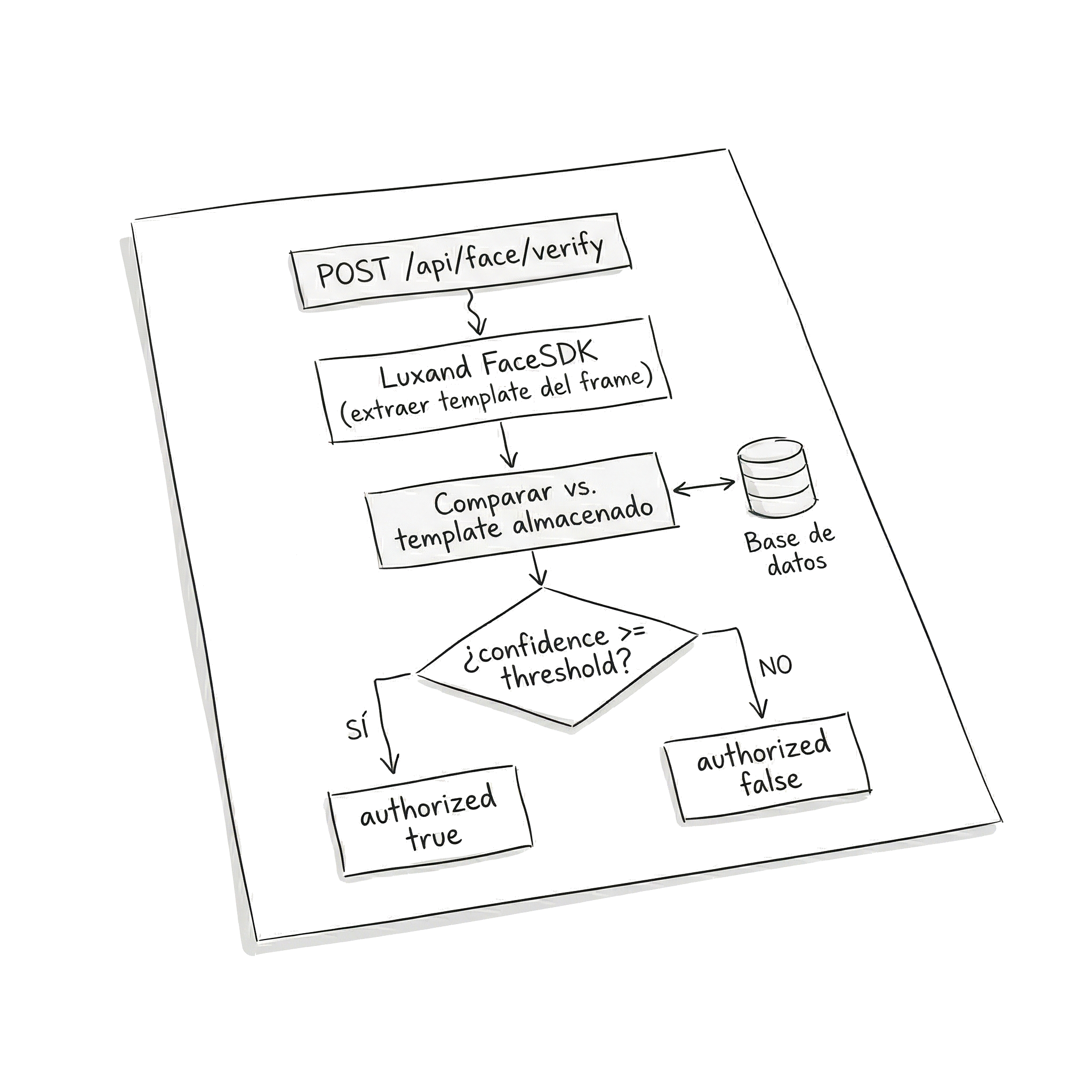
The API exposed a verification endpoint that received the image in base64 along with the user ID, and responded with an authorization boolean and the match confidence level.
The confidence threshold was one of the parameters we adjusted most during development. Too high and the system would frequently block the legitimate user (lighting changes, slightly different angle). Too low and the system was permissive with similar faces.
What Worked and What Didn’t
Worked well:
The frontend/backend separation proved to be the right decision. face-api.js was fast enough for continuous detection — the Tiny Face Detector ran without visible issues on modern machines — and the “block immediately if there are multiple faces” logic did not need recognition precision, only detection.
The automatic block/unblock felt fluid when conditions were good: adequate lighting, quality front camera, user centered in the frame.
Did not work as well:
- Lighting. In offices with strong backlight (windows behind the user), detection failed. face-api.js lost the face, the system assumed no one was there, and blocked the screen even though the user was present. Frustrating.
- Low-quality cameras. Webcams integrated in budget laptops produced noisy images. Detection worked, but verification on the backend lowered its confidence score, generating false negatives.
- User moves out of frame. If the user leaned back in their chair or turned their head to talk to someone, the system could lose detection or lower its confidence. Technically correct — if you are not looking at the screen, perhaps it should block — but in practice it generated constant interruptions.
- Model weight. The face-api.js files add up to several MB. On the first load, the user had to wait for the download and parsing of the models before detection started. We implemented caching with service workers, but the initial load was still perceptible.
Privacy and Regulation: The Irony of the Case
There is something ironic about using facial recognition to protect the privacy of documents. You are processing biometric data — the most sensitive category under most regulatory frameworks — to protect the confidentiality of other data.
When we built this in 2023, the MVP was focused on the United States. At the time, the regulatory landscape was already complex, but it has intensified significantly since then. Illinois BIPA (Biometric Information Privacy Act) remains the strictest biometric privacy law in the country: it requires written consent before collecting biometric identifiers, published retention policies, and grants individuals the right to sue directly — something that has generated multimillion-dollar litigation. Facebook paid $650 million for violating BIPA with its facial tagging system, and Meta paid $1.4 billion to Texas in 2024 for similar violations under Texas law (CUBI).
Today, more than 20 states have privacy laws that classify biometric data as “sensitive” and require some form of consent. Colorado, for example, tightened its requirements since July 2025, requiring informed written consent and documented retention policies. And the trend is clear: more states are expected to pass similar legislation in the coming years.
What does this mean for an application like the one we built? If your product is going to operate in Illinois, Texas, or any state with active biometric legislation, you need at minimum: explicit and informed user consent before capturing facial data, a public retention and destruction policy for biometric templates, and secure storage of all biometric information.
The architecture we chose — detection on the client, without sending continuous video to third-party servers — turned out to be an advantage from a compliance perspective, even though we did not design it with that intention. Frames were only sent to our own backend when identity verification was necessary, and biometric templates never left our infrastructure. If we had used a third-party cloud service, each frame would have traveled to external servers, significantly complicating regulatory compliance in states like Illinois, where the chain of custody of biometric data matters.
What I Would Choose Today (2026)
If I had to redesign this architecture today, I would change the frontend. face-api.js is effectively abandoned — the original repository has not received significant updates since 2020, and issues accumulate without response. There are community-maintained forks, but relying on a project without active maintenance for a security component is unacceptable.
MediaPipe from Google would be my choice for the frontend. Available as an NPM package (@mediapipe/tasks-vision), it offers face detection and landmarks with BlazeFace models optimized for on-device inference. Its key advantage: it is actively maintained by Google, supports inference via WebAssembly with GPU delegation, and its API is designed for real-time processing — exactly what we need for continuous monitoring. Integration with React would follow the same architectural pattern: a component that encapsulates the webcam and the detection loop, but using FaceDetector and FilesetResolver from MediaPipe instead of face-api.js.
On the backend, Luxand FaceSDK remains a solid option — version 8.3 released in 2025 includes improvements for WebAssembly and multi-platform wrappers. But today I would also evaluate whether MediaPipe Face Landmarker, combined with a facial embeddings model running on the server, could replace Luxand and eliminate the dependency on a commercial license. The answer depends on the precision requirements — for an MVP, probably yes; for a system where security is critical, Luxand or a similar solution with published benchmarks remains the safer bet.
My Conclusions
Facial recognition in web applications is not just a machine learning problem — it is a problem of architecture, performance, UX, and regulation.
Separating detection from recognition between frontend and backend was the most accurate decision in the project. It allowed using lightweight tools where speed mattered (the browser) and precise tools where accuracy mattered (the server), without coupling both responsibilities.
Continuous monitoring is harder than one-time authentication. A facial login happens once — controlled conditions, the user cooperates, tolerance for a couple of seconds of latency. Continuous monitoring must work all the time, with variations in light, angle, and user attention. False negatives are more destructive than false positives, because they repeatedly block the legitimate user.
Regulation is no longer a “we’ll figure it out later.” In 2023 we could build first and worry about compliance afterward. In 2026, with more than 20 states in the USA with active or pending biometric privacy legislation, and multimillion-dollar litigation as precedent, privacy architecture must be designed from day one.
For teams building MVPs: the combination of client-side detection + verification on your own backend remains the most pragmatic pattern. It gives you control over costs, privacy, and performance. Just make sure to choose actively maintained tools — face-api.js is no longer maintained, and building on abandoned projects is technical debt from the first commit.
References
- face-api.js — JavaScript API for Face Detection and Face Recognition in the Browser and Node.js with TensorFlow.js.
- @vladmandic/face-api — Maintained fork of face-api.js with compatibility for recent versions of TensorFlow.js.
- Luxand FaceSDK — Commercial on-premise facial recognition SDK for multiple platforms.
- MediaPipe Face Detection (Google) — Facial detection and landmarks for web applications with on-device inference.